Where knowledge
turns into narrative.
Drop in your meetings, emails, and quick notes. Runwita turns them into a continuous, navigable record of how the work has evolved. Topics, decisions, people, all linked.
Built for consultants, customer success managers, researchers, founders, anyone shepherding work across many notes and many months. Local-first, on your Mac.
Here's what comes out the other end. A journey is one project or arc you're tracking. Each row below is a topic, a thread that runs across multiple meetings or notes. Each dot is a moment when that topic surfaced. Click the blocked one to see why.
You're not dropping the thread out of carelessness. You're dropping it because nothing around you is built to hold it.
The decision lives in a Slack thread from March. The follow-up hides in an email from February. The pivot sits in a meeting note you scribbled on a train. And the offhand comment that quietly changed everything? That one's still in your head, where no one else can see it, and no system can touch it.
Each tool captures a fragment and calls it a job well done. None of them see the whole shape of the work. Not the project, not the renewal, not the dissertation, not the deal, not the rollout. They don't track how a position evolved, or notice when momentum fades into silence. They don't remember what mattered, only what was recorded.
So you become the system. You carry the context, connect the dots, sense the drift before it turns into risk. You hold the arc together, quietly, constantly, even when it was never your role to do it.
You're good at this. Sharp enough to keep the story intact across chaos.
But you shouldn't have to be.
You decide what enters the story.
Drop in a meeting transcript. Forward an email. Capture the thought before it evaporates. Paste the Slack thread. Snap the whiteboard before it's wiped clean. Everything flows into one place. No folders to babysit, no tags to maintain, no quiet admin tax on your attention.
This isn't about dumping everything you touch. It's about choosing what matters while it's still fresh, while context still has edges. Mindful capture beats the firehose. What goes in shapes what you'll see later: patterns, signals, the early hints of something shifting.
Bad input doesn't just sit there. It muddies the water.
Good input? That's where the story starts to take form.
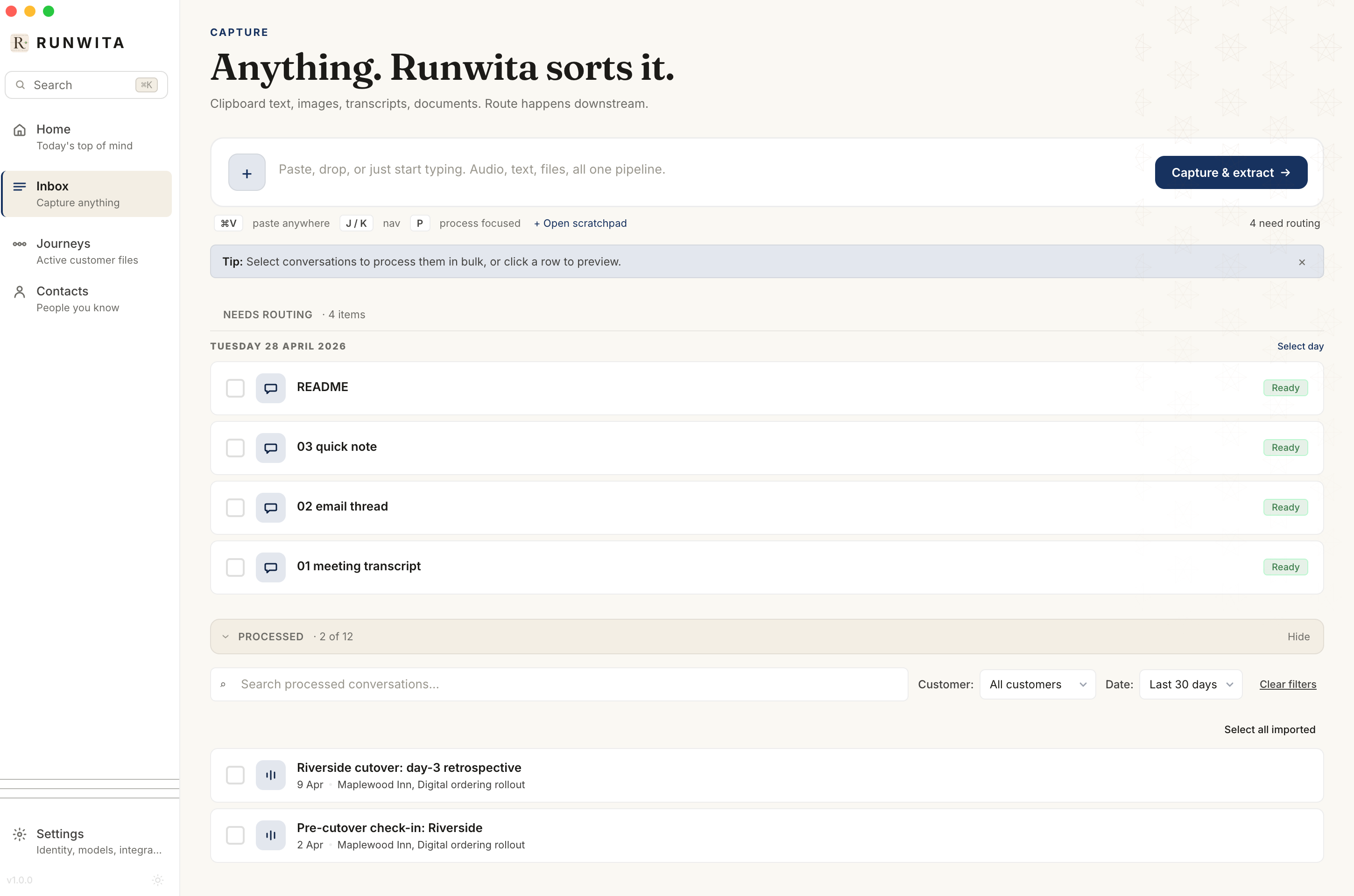
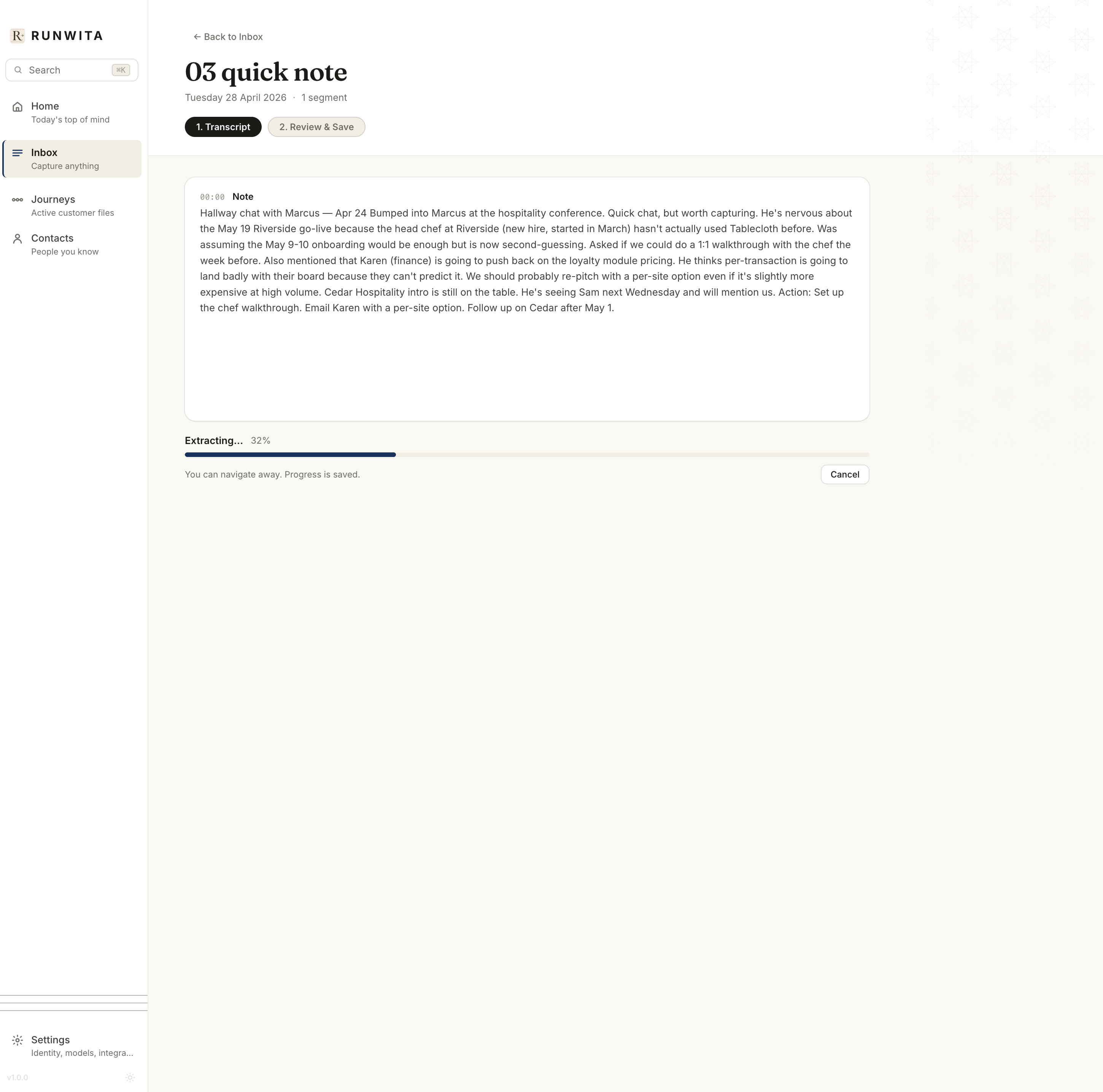
Runwita reads, connects, and shapes the thread.
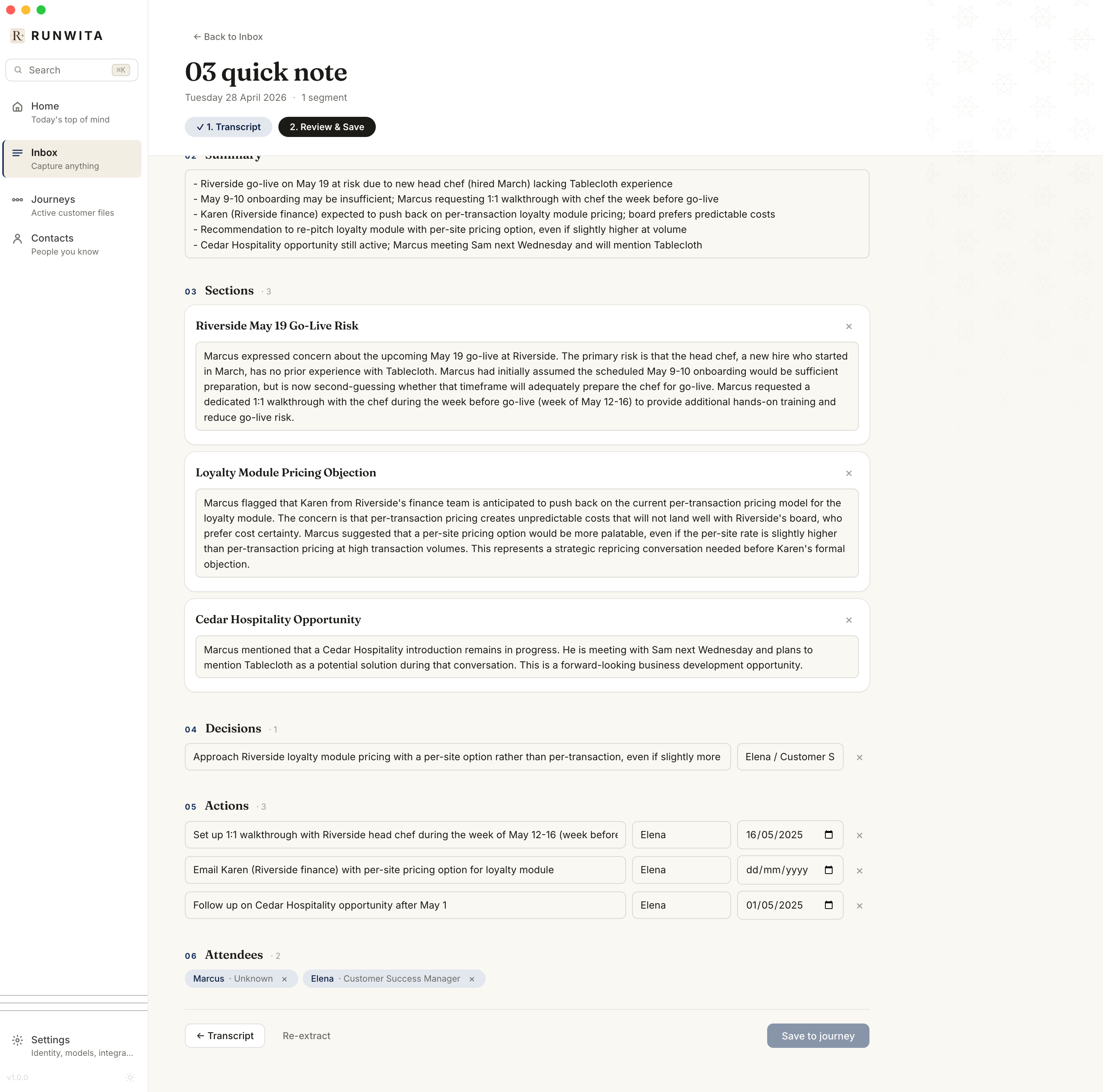
Click extract, and the chaos gets quietly organised. Summaries surface. Topics line up. Decisions, actions, and people are pulled into view without you hunting for them. What used to be buried in paragraphs now stands up, labelled and legible.
Then it does the part your tools never could. It links this piece to everything that came before. The same idea across ten meetings stops being ten fragments and becomes one continuous arc. You can see how it started, how it shifted, where it landed, and where it might be drifting.
Nothing is locked in. You review, tweak, and decide what stays.
The interpretation is still yours. Runwita just clears the fog so you can see it.
The journey, alive.
What you get back isn't a dashboard. It's a living view of the work. Threads unfolding with their trajectories, not frozen snapshots. Decisions that still stand, actions that still owe you something, people woven through it all instead of scattered across tools.
Open any thread and the whole history opens with it. You see how it began, where it bent, what nudged it off course. Nothing feels lost because nothing is isolated.
With Pro, a quiet layer of intelligence sits on top. Health signals flicker when something's drifting. Watch items surface before they become problems. A weekly synthesis pulls patterns out of the noise, the kind you'd normally have to juggle in your head.
So the story doesn't just exist.
It keeps moving, and you can finally see where it's going.
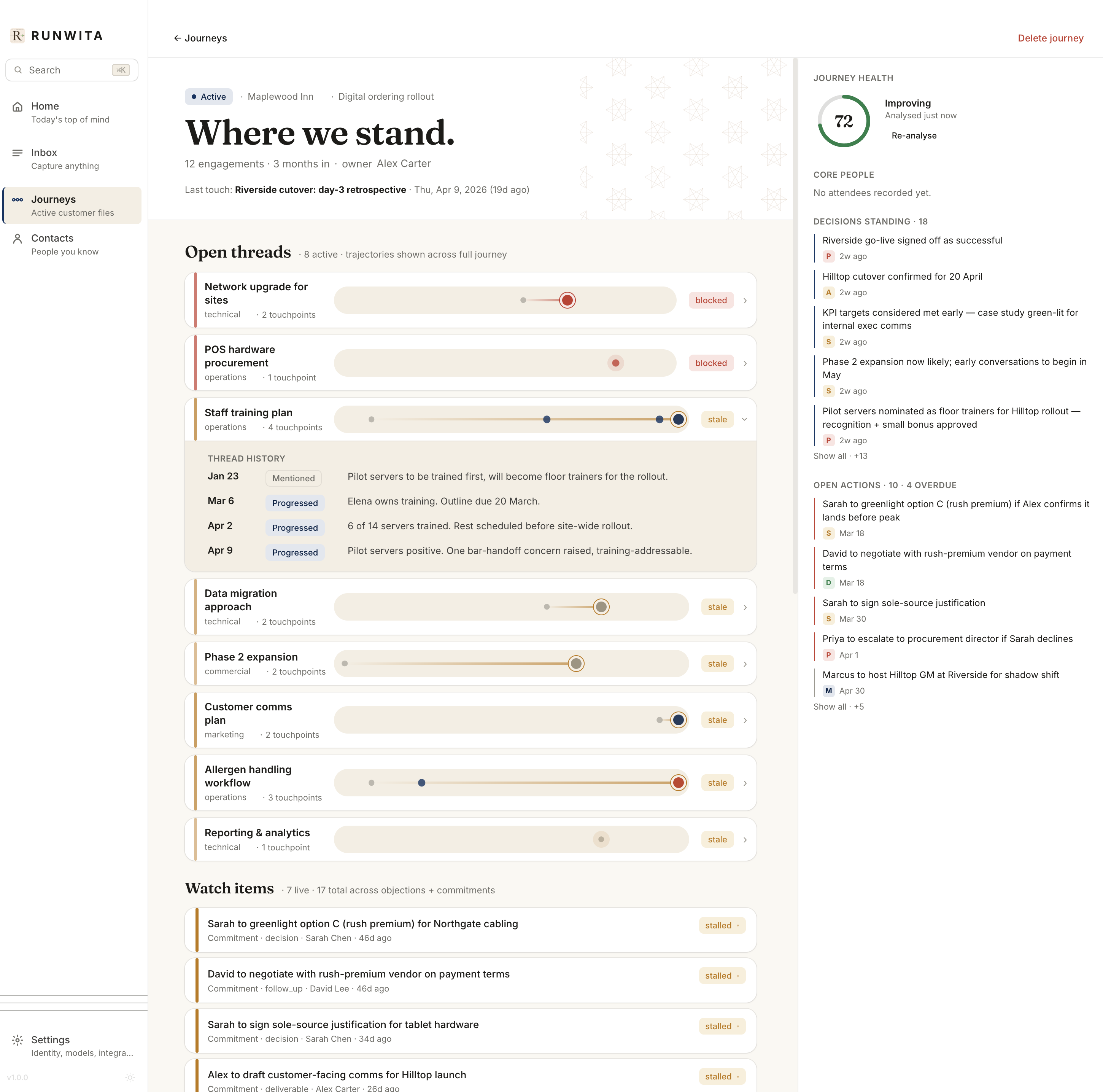
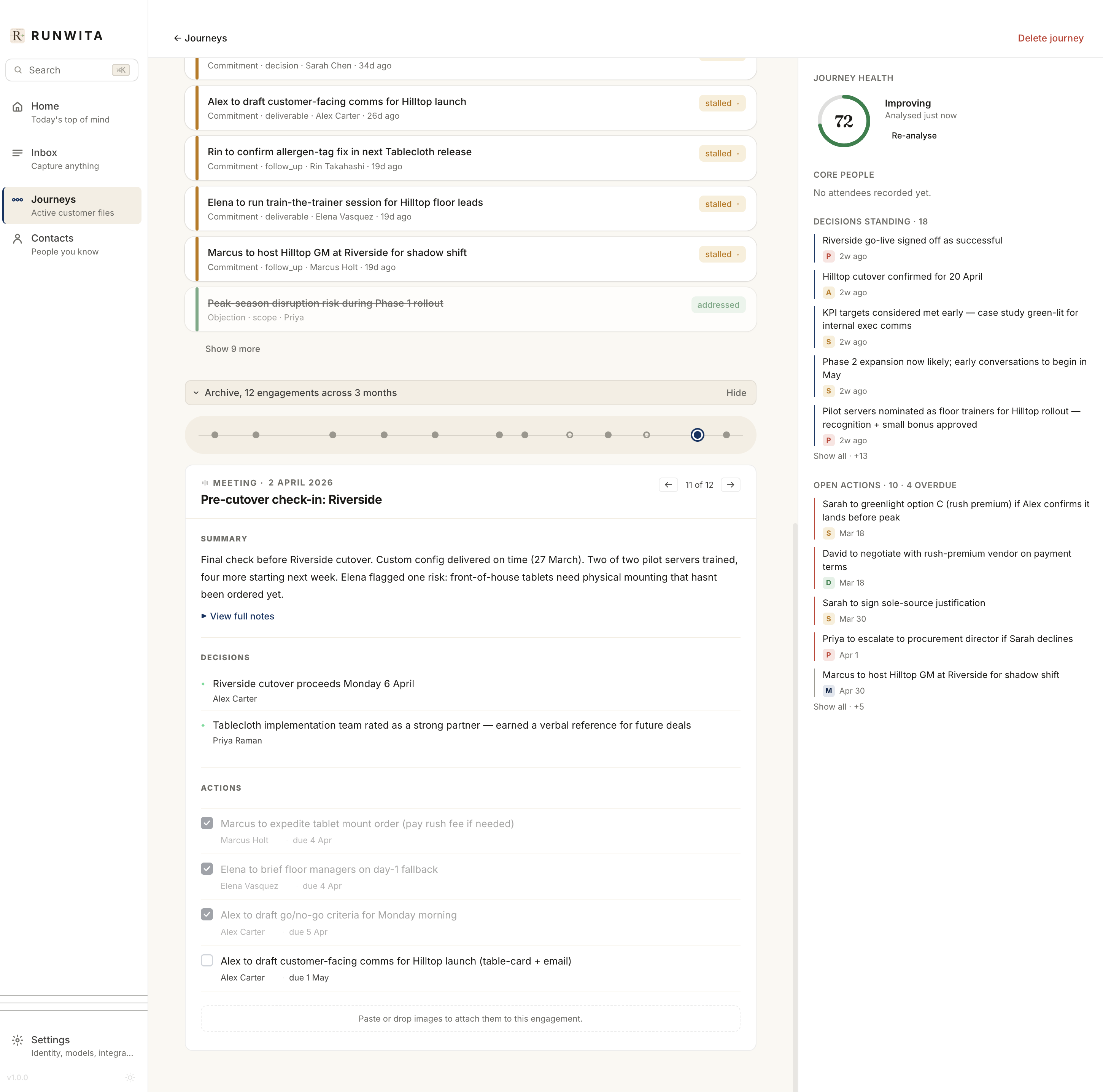
Every thread keeps its full history. Click to unfold.
Six months on, you can still land on the exact moment something first surfaced.
No archaeology, no guesswork. The thread doesn't blur with time. It keeps its shape.
Each piece of work holds together inside the journey. A meeting, an email, a note, intact, but unpacked into what actually matters. What was decided. Who owns what. What's still open and quietly waiting.
You can close the loop as things move. Tick actions off when they're done. Re-extract when context shifts and you need a cleaner read. Nothing gets locked in too early, nothing slips away.
And the detail doesn't vanish into someone else's cloud. It stays with you, complete and accessible, long after everyone else has forgotten where it lived.
Knowledge isn't a pile. It's motion.
Topics don't live alone. They reach for each other. Conversations don't end. They echo forward. Decisions don't sit still. They carry a past and bend the future. When you can see those connections, the work stops feeling like fragments and starts reading like a continuous journey.
So instead of spelunking through folders or rebuilding context from memory, you watch the arc take shape as it happens. The scattered pieces find their place. The fleeting moments leave a trail. What once felt like noise begins to resolve into something coherent, something you can actually navigate.
Runwita captures that movement. Not just what happened, but how it unfolded. So you can step back in, share the thread, and keep building, without ever losing where you were.
Your work isn't something to hand off lightly. It stays on your Mac, where it belongs.
Everything lives in a single SQLite file you own and control. No hidden layers, no quiet replication to someone else's servers. For AI extraction, bring your own Claude or OpenAI key, or keep it fully local with Ollama. You decide how much of the outside world gets involved, if any.
No telemetry ticking in the background, no dependency on being online. It works on a flight, inside a locked-down office, or years from now when everything else has shifted. The only time you'll need an account is if you choose to switch on cloud sync later, and even then it's opt-in.
Cloud sync will come later, as an opt-in layer. Small, separate, and deliberately optional. The core promise doesn't change: if you want your work to stay local, it stays local.
If Claude is already your second brain, Runwita becomes its memory.
(If you don't use Claude or AI tools day-to-day, skip ahead. The next section is for power users.)
Pro ships with a built-in MCP server, so Claude Code, Claude Desktop, Cursor, or anything MCP-compatible, can read your journeys, write back into them, and keep the thread intact as you work. No copy-paste gymnastics, no context getting lost between tools.
Drop a transcript into Claude and tell it, "add this to the Maplewood journey." It files it where it belongs. Contacts are deduped, topics matched, decisions pulled out, actions assigned. The messy middle gets handled, quietly.
What you end up with is something Claude alone can't hold: persistent, structured project memory. Not just answers in the moment, but a running story it can keep building on with you.
Try free. Try Pro for a month. Pick what fits.
Every paid signup gets a one-month Pro trial. Card on file, full features, switch to Free or cancel anytime before it ends.
- 1 journey (one project or arc), 30 engagements (meetings, emails, or notes)
- AI extraction (decisions, actions, contacts)
- Topic threading across the journey
- Local-first, your data stays on your Mac
- No credit card
- Everything in Free, no limits
- AI insights: journey health, watch items, weekly synthesis
- Built-in MCP server (Claude, Cursor, Cowork)
- TickTick two-way sync
- 1-month trial, card on file, cancel anytime
- 14-day refund, no questions
On the roadmap: Linear, Asana, Notion two-way sync
Start 1-month trial- Lifetime access to Pro features
- Two years of updates included
- Future cloud sync, 12 months free
- Direct line to me for feedback
- Closes at 200 licenses, never reopens
Lifetime updates apply to the desktop app. Cloud sync and any future cloud features are subscription-only and not included beyond the first 12 months.
Claim my Believer slotStudent or non-profit?
If you're a verified student or a registered non-profit, you get 50% off for life.
Just email contact@runwita.com from your .edu address, or attach proof of enrolment or non-profit registration. We'll send you a one-time discount code.
Simple deal: less friction, same full product, just priced for the people building things that matter.
The things you're probably wondering.
What is Runwita?
Runwita turns scattered work, meetings, emails, notes, transcripts, into a connected, evolving view of your projects. Instead of isolated documents, you get a living narrative of what's happening, what changed, and what still matters.
How is this different from Notion or Obsidian?
Those tools store information. Runwita reconstructs context. It links decisions, people, and actions across time so you can see how work evolved, not just where it was written down.
Does it replace my note-taking tools?
Not necessarily. It can sit alongside them or gradually absorb their role. The difference is that Runwita is opinionated about structure. It actively builds relationships between your inputs instead of leaving that work to you.
Who is this for?
People who manage complex, ongoing work: consultants, customer success managers, researchers, founders, students, operators, anyone who loses track of context across time and tools.
What's the difference between Free and Pro?
Free gives you the core: AI extraction, topic threading, the journey view. Limited to one journey and 30 engagements so you can feel the shape on a real project. Pro removes the limits and adds AI insights (journey health score, watch items, weekly synthesis), the MCP server for Claude integration, and TickTick sync. Every Pro signup gets a one-month full-feature trial.
Where does my data live?
Locally on your Mac. Everything is stored in a single SQLite file you own and can move, inspect, or back up at any time.
Is my data used to train AI models?
No. Your data stays yours. There's no training pipeline, no hidden reuse, no background telemetry.
Which AI models does Runwita use?
You bring your own key (Claude or OpenAI), or you can run extraction locally using Ollama. Runwita is the structure layer, not the model provider.
Can I edit what Runwita extracts?
Yes. Nothing is final without your review. You can tweak summaries, fix structure, re-extract, or override anything Runwita produced.
Does it work offline?
Yes, fully. Local-first means it runs on a plane, in a secure environment, or anywhere without internet access. The only network call happens when you trigger AI extraction with a hosted model.
Will there be cloud sync?
Yes, but optional. It will be a separate subscription layer when it ships, Obsidian-style. The core product stays fully local-first for anyone who doesn't want it.
Mac only?
For now, yes. Apple Silicon Macs (M1+). Windows and Linux are not on the immediate roadmap. A mobile companion is being thought about.
Is there a student or non-profit discount?
Yes. Verified students and registered non-profits get 50% off lifetime. Email contact@runwita.com with proof and we'll send a one-time code.
What's the catch?
No catch. Real product, fairly priced, made by one person who uses it daily. If you don't love it, refund within 14 days.
It doesn't just store your work. It helps it speak.
Drop your email. You'll be in the first wave of early access, with a Believer slot reserved if you want one. No spam. You'll hear from me when there's something real to show.
Or talk to me, 30 minutes, no pitch